
Independent consulting has a ceiling, and the ceiling is you. Every client gets your attention one at a time: switch repositories, reload the context, write the code, run the tests, ship, then answer the email that arrived while you were heads-down. Taking on a fourth client means less of you for the other three. Hiring raises the ceiling, but it turns you into a manager of people.
There's another way to raise it: run a small software factory. One Mac does the work, an agent for each client holds that client's context and starts the coding, and you direct and review. This post covers how to set that up with SeaSalt, what a working day looks like, and which parts still have to be you.
What "software factory" means here
It doesn't mean "AI writes everything." It's a structure with three parts:
- One Mac does the work. Agents run on your Mac, in each client's folder, with the git setup, CLIs, and sign-ins you already have.
- One agent per client. Each client gets a workspace whose agent keeps that client's instructions, context, and priorities, and starts the coding work.
- You direct and review. You decide what gets built, approve anything risky, and read what ships. You stop being the typist.
The constraint you're removing isn't your skill. It's that you could hold only one client's context at a time, and only while you were at your desk.
Set up a workspace per client
In SeaSalt, each workspace has exactly one agent, tied to a folder on your Mac. Create one per client (the Mac app suggests "a project, client, business, or personal agent") and point it at the folder where that client's code lives.
Then fill in its Agent brief:
- Mission: what you're doing for this client. "Maintain the storefront and ship the checkout redesign this quarter."
- Operating instructions: the rules for this client. Which branch to work from, how they want pull requests, their code conventions, "never run migrations against production."
- Context sources: a website, a document, or a local folder the agent should treat as reference, such as the statement of work, their API docs, or the design spec.
- Standing intents, skills, and routines: ongoing goals, repeatable procedures, and scheduled work.
The brief becomes your decision log for that client. When a client says on a call that every API change must be versioned, tell the agent "from now on, version every API change." It can add that to its own instructions or record it as a standing intent. The next session in that workspace starts with the rule, whether or not you remember it.
One deliberate limit: a Work Session's transcript doesn't automatically become the agent's memory. Only what you or the agent decide to keep is kept, so one abandoned attempt doesn't rewrite a client's rules. We go deeper on this in why every project gets its own agent.
The coding happens in Work Sessions
The client's agent coordinates. Work Sessions do the coding. A Work Session is a bounded job: "fix the coupon rounding bug and add a test," or "upgrade the framework and get the build green." The agent starts sessions when you give it work, or you start one yourself. They run in the client's folder using Claude Code, Codex, or Devin CLI.
Every session can be inspected. You get its live activity, a Changes pane with per-file diffs, a terminal you can connect to, and the workspace's dedicated agent browser. When a turn ends you send a follow-up. While a turn is still running you can Steer it, which delivers your message at the agent's next step instead of queueing it behind the turn. The client's agent can steer its own sessions too, when a result shows one is heading the wrong way.
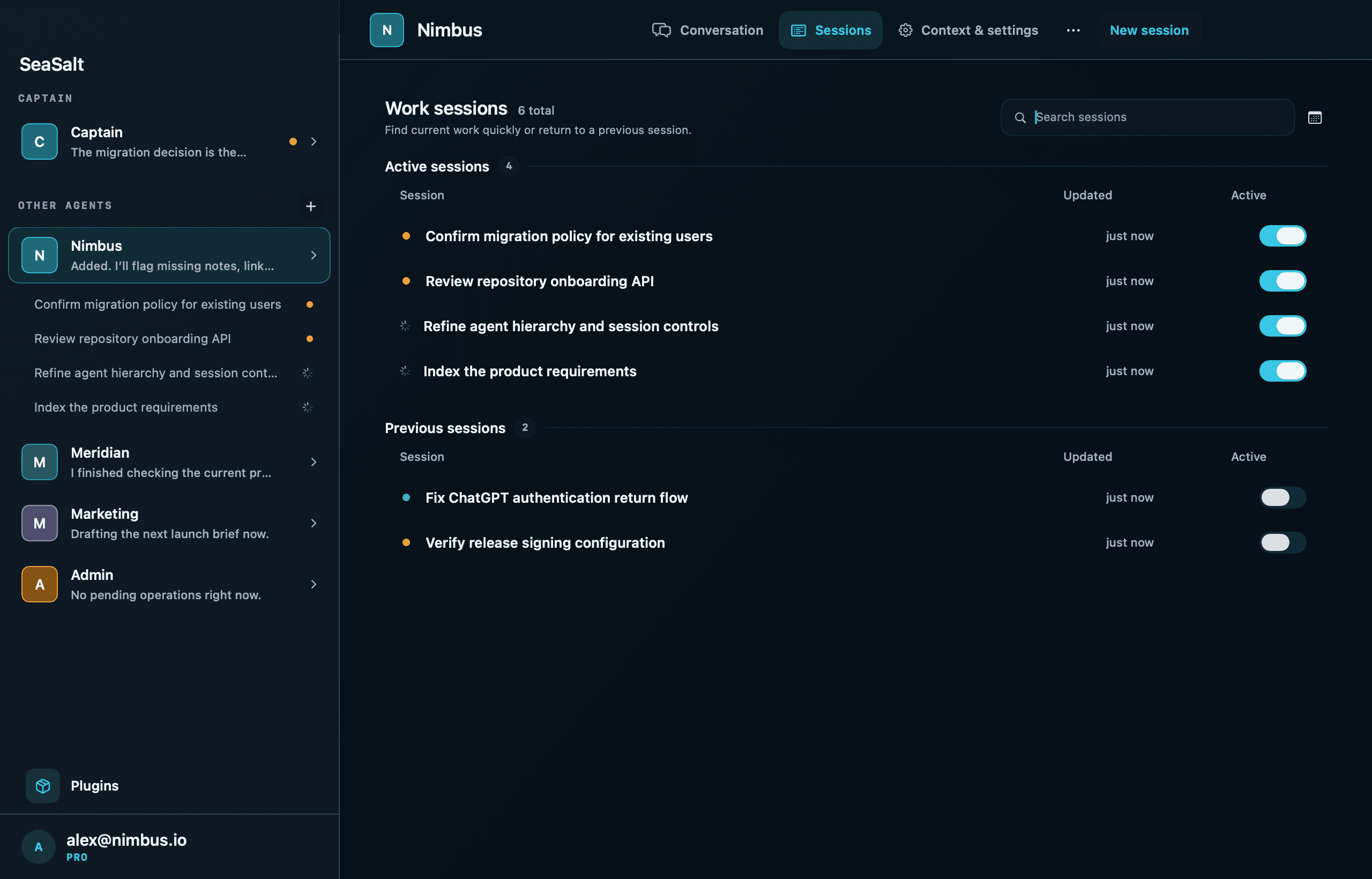
This is what makes several clients manageable: a list of bounded jobs that each keep a record, instead of a dozen terminal tabs and your memory.
One place to ask across clients: the Captain
With several clients you need somewhere to ask where everything stands. That's the Captain, one per account. It can list your workspaces, ask any client's agent a question, and inspect or steer Work Sessions in any workspace.
It can't start Work Sessions itself. When work needs doing for a client, the Captain asks that client's agent, because that agent holds the instructions, folder, and plugin access that make the work go right for that client.
Staying reachable with the iPhone app
The Mac does the work. The SeaSalt iPhone app keeps you connected to it when you're somewhere else:
- The Agents tab lists the Captain first, then each client's agent with its active Work Sessions underneath, so you can see what's running, what's awaiting approval, and which replies you haven't read. If you've paired more than one Mac, a picker switches between them.
- Notifications arrive when a turn finishes or fails, when an agent replies, and when something is awaiting approval. You can reply to an agent from the notification, and answer an approval with Allow Once or Deny without opening the app. Except for approvals, notifications are held while you're active at your Mac.
- Start and steer. Talk to any agent, start a Work Session, set its permission mode, pick the model, and Steer a turn that's running.
- Review. Each session shows its steps, the agent's result, and Changed files with diffs.
- Remote access. The Remote tab gives you Terminal, Files, and Desktop on the same Mac, end-to-end encrypted between your phone and your Mac.
The point is to stay reachable and keep the work moving. It isn't to work around the clock. A client's work shouldn't sit idle all afternoon because it needed a one-line answer while you were in another client's meeting.
A day in the factory
Here's what that looks like with three clients. The names are made up.
Morning triage across three clients
Coffee in one hand, phone in the other. Ask the Captain: "Give me a quick read on Acme, Northwind, and Harbor. Call out anything waiting on me." It checks with each client's agent and comes back with one answer. Acme's dependency upgrade from last night finished with one failing test. Northwind's agent is waiting on your decision about a data migration. Harbor is quiet.
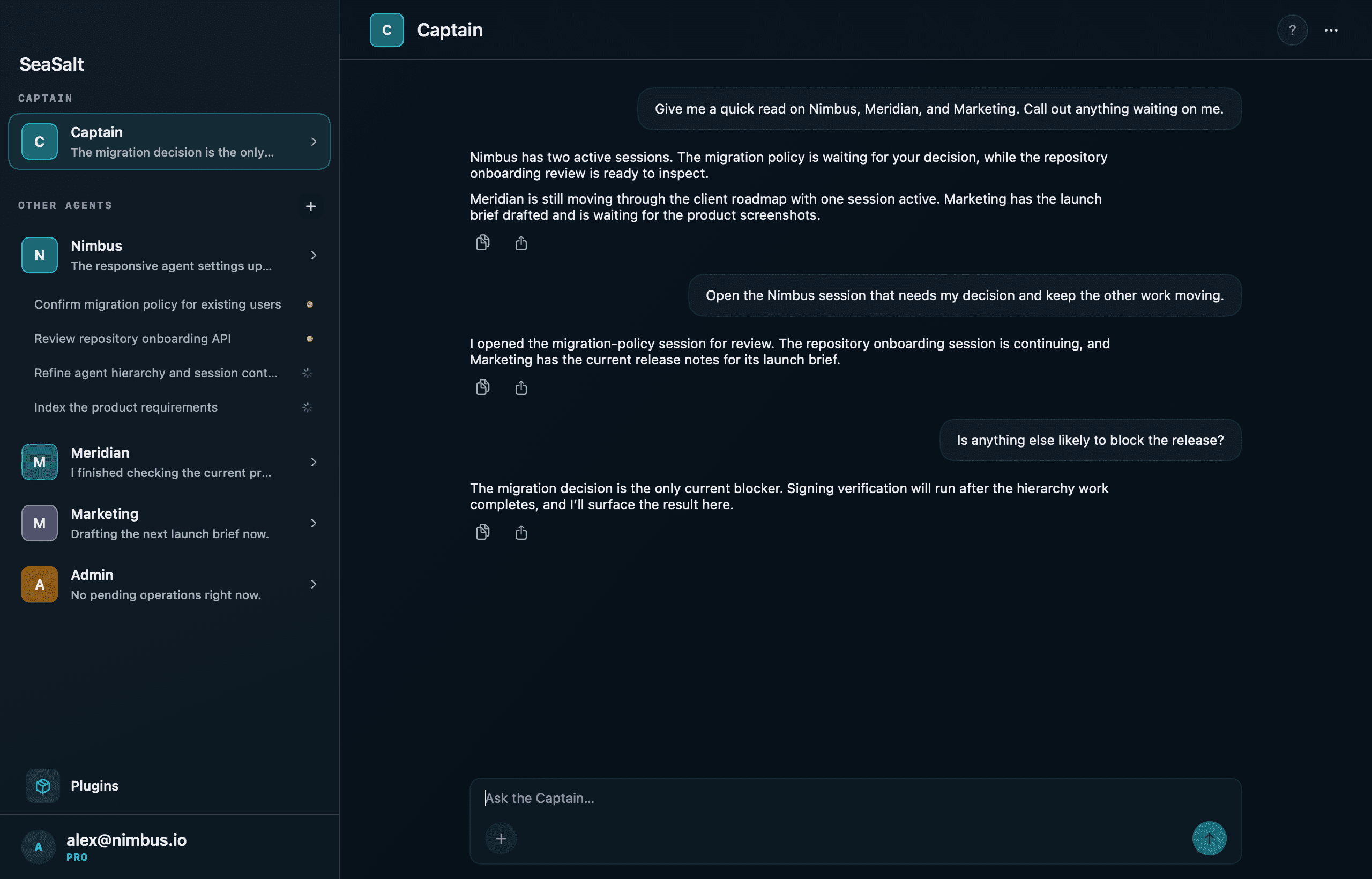
You answer Northwind in its agent's chat and tell Acme's agent to fix the failing test in the same session, which keeps the history together. You haven't opened a laptop yet.
A bug report while you're out
Mid-afternoon, Harbor emails: order totals are off by a cent on discounted orders. Open Harbor's agent on your phone, paste the report, and give it a finish line: "Reproduce this with a test, fix it, and tell me what caused it." The agent starts a Work Session with Harbor's rules already in its brief. Put the phone away.
A notification arrives when the turn finishes. Open the session to see the steps it took, its explanation, and the changed files. If you look in while it's still running and it's heading the wrong way, Steer it: "Leave the tax calculation alone. The problem is in the discount helper."
Approving a deploy from your phone
Harbor's sessions run in Ask for approval mode. When the session reaches the deploy command, it stops and asks. The request goes to your Mac first and reaches your phone because you're away from it (or after two minutes without an answer). The approval card shows the full command. You check it's the deploy you expect and tap Allow Once.
If you miss it, the request expires after five minutes and counts as denied. A missed notification never turns into a silent yes. For the full approval flow, see steering a coding agent from your iPhone.
End-of-day review
Back at your desk, go client by client in the Mac app. The session list shows what finished and what failed. Read the diffs properly here, not on a phone. Merge what's ready, and send follow-ups where it isn't.
Then do two things that pay off tomorrow. Write today's decisions into each client's brief. And start the longer jobs before you leave, so they run while you're away. The Sleep prevention setting keeps the Mac awake for active sessions.
Operating rules that keep it safe
Keep clients separate
- One workspace per client, pointed only at that client's folder, so each agent's instructions and context stay about that client.
- Turn plugins on per agent. Plugins such as Linear, Notion, GitHub, or Stripe are enabled per agent, and each kind of action (read-only, changes data, external communication, destructive) is set to Allow, Ask, or Deny. One client's agent doesn't get the access you turned on for another.
- Know where the separation stops. The AI provider and its sign-in are set per Mac, so every agent on a Mac uses the same provider account. A Mac also holds one connection per plugin. If a client requires their own model account or fully separate credentials, pair a separate Mac for that client. Pro lets you pair more than one.
Gate anything that reaches a client's production
Put sessions that can touch deploy scripts or production credentials in a strict mode: Ask for approval with Claude Code, or Ask for approval or Workspace only with Codex. Loosen it per session (Allow edits, Auto) for work that stays in a branch. Write rules like "never push to main, open a pull request" into the operating instructions, but treat the permission mode as what actually enforces them.
Sessions edit the client's folder directly, not a copy. Commit or stash before handing a folder to an agent, and give parallel sessions in the same folder work that doesn't touch the same files.
Control cost
Every agent chat and Work Session has a model picker in the composer, and a change applies from the next reply or turn. Use a smaller, cheaper model for mechanical work such as dependency bumps, lint fixes, and test scaffolding. Save the larger models for debugging and design questions. The picker chooses among the models of your Mac's provider. With Claude Code and Codex you can switch per chat and per session, while Devin keeps its model for the whole session. Agents can also run local models through Ollama or LM Studio.
Model usage runs on your own provider account, so price it into your rates.
Keep the human parts human
| Keep it yourself | Hand it to agents |
|---|---|
| The client relationship: calls, scope, bad news | Reproducing bugs and writing the failing test |
| Architecture decisions | Upgrades, migrations, and mechanical refactors |
| Final review of anything that ships | First drafts of features against a clear spec |
| Deciding what goes into the brief | Investigating "why is this slow" or "why did this break" |
An agent can propose an architecture. You decide, then write the decision into the brief so every later session follows it.
The honest limits
- Agents need review. They produce confident, plausible, wrong answers often enough that skipping review isn't an option. The factory multiplies output, and review stays the bottleneck on purpose.
- You're still accountable. The client's contract is with you. "The agent did it" isn't an answer.
- Check your contracts. Some clients restrict AI tools or where code may be processed. With SeaSalt, the code stays on your Mac and model requests go to the provider you chose. Agent conversations, session progress, and diffs sync through SeaSalt's servers so your phone can show them, encrypted in transit but not end-to-end. Exactly what stays local and what syncs is written up separately. Tell clients what you use.
- Your Mac has to be on. Sleep prevention keeps it from idle-sleeping, but a Mac that's shut down or asleep runs nothing.
- Phone review is triage. Approve the direction from your phone. Do the careful read at a desk before anything merges.
What you need
SeaSalt's Free plan runs 2 agents at once with local models (Ollama, LM Studio). The iPhone app monitors agents, and remote access is terminal only. That's enough to try one client workspace.
The workflow in this post needs Pro, at $15 a month or $144 a year. Pro gives you unlimited agents at once, cloud models with your own accounts, starting and approving agents from your iPhone, and the file browser and remote desktop. Three clients' work moving in parallel needs more than two agents at once, and handling approvals away from your desk needs approving from the iPhone. New accounts start with a 14-day Pro trial.
macOS 15+ · iOS 18+