
Most AI coding tools give you one long chat. That's fine for an afternoon. It stops working when you have four repositories, three half-finished tasks, and a conversation so long that the model has lost track of what it agreed to an hour ago. SeaSalt splits the work into three layers instead: a persistent agent for each project, Work Sessions that do the actual coding, and a Captain above all of them. This post explains what each layer is for and the problem it fixes.
The problem with one long chat
A single conversation runs into the same problems sooner or later:
- Context bleeds between projects. A billing fix ends up right next to a question about launch copy, and both pay for it.
- You can't tell what's running. One thread doesn't tell you which task is finished, which one is stuck, and which one is waiting on you.
- Standing instructions get lost. "Use the staging AWS profile" and "never push to main" sit 400 messages up, until the model forgets them.
- The record and the work are tangled. What the project is and what one attempt tried end up in the same place.
Each layer below takes one of these problems away.
Layer one: an agent for every project
In SeaSalt, each workspace has exactly one agent, tied to a folder on your Mac. The agent keeps one ongoing conversation that doesn't reset when you close the window.
What makes it persistent is the Agent brief: a mission, operating instructions, the local workspace folder, a GitHub organization, and the agent's dedicated browser. Next to that are durable context sources: a website, a document, a local folder, a Notion page, or a GitHub repository the agent should treat as reference. The agent also keeps standing intents, skills, and routines (scheduled work).
The agent can update all of this itself. Tell it "from now on, run the migration check before touching the schema", and it can add that to its own instructions or record it as a standing intent. Your rule then lives in the agent's brief instead of somewhere in the scrollback.
One deliberate limit: a Work Session's transcript does not automatically become the agent's memory. What a session tried and abandoned shouldn't become the project's rules. Only what you or the agent decide to keep gets kept.
Layer two: Work Sessions do the work
The project agent coordinates. The coding happens in Work Sessions.
A Work Session is a bounded coding conversation with one job: "fix the webhook retry," "add the pricing toggle," "find out why the build is slow." The agent starts sessions when you give it work, or you start one yourself with New session. Each one runs on your Mac in the project's folder, using the coding executor you've chosen: Claude Code, Codex, or Devin CLI.
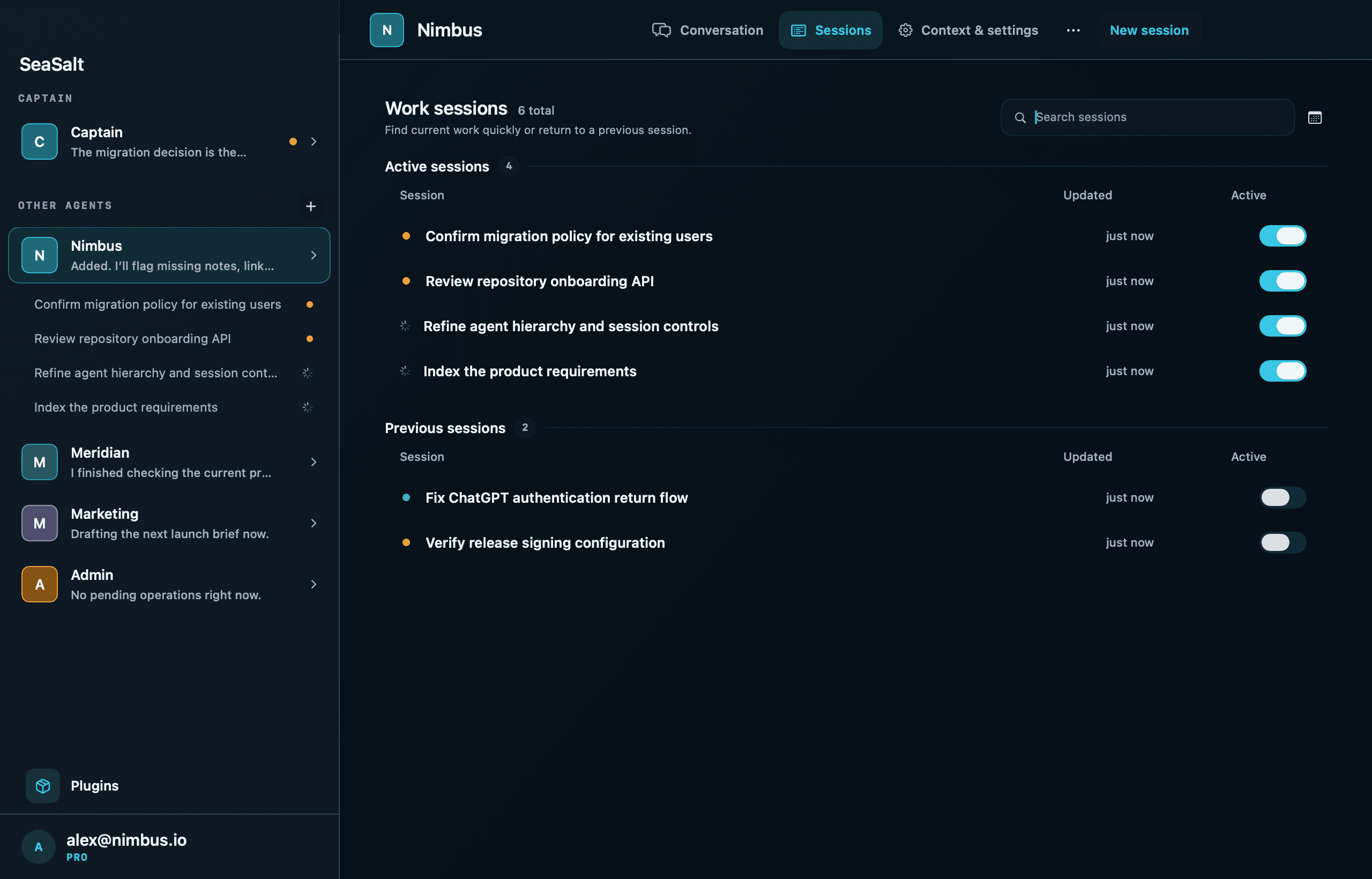
Each session is something you can open and inspect. You get a live activity view of what it's doing, a Changes pane with per-file diffs, a terminal you can connect to, and the workspace's agent browser. When a turn ends you can send a follow-up, steer it mid-turn, or retry it in place. The session is the unit of work, and it stays there for you to review.
Keeping coding in sessions rather than in the agent's own conversation helps in four ways:
- Scope. One job per session makes "done" easy to judge.
- Visibility. The session list shows what's active, what finished, and what failed, at a glance.
- A clean agent. The project agent reads a session's result, not every step of its transcript, so its own conversation stays about the project.
- Several jobs at once. One agent can have more than one active session. They all work in the same project folder, so give parallel sessions work that doesn't touch the same files.
Layer three: the Captain
Above the project agents is the Captain, one per account. It's the conversation for direction across projects.
The Captain can list your workspaces, create and update agents, ask any agent a question and wait for its answer, and look into Work Sessions in any workspace to inspect, steer, complete, or cancel them. In the Mac app's words: "The Captain can create and update agents, ask them for project context, and show or steer their sessions."
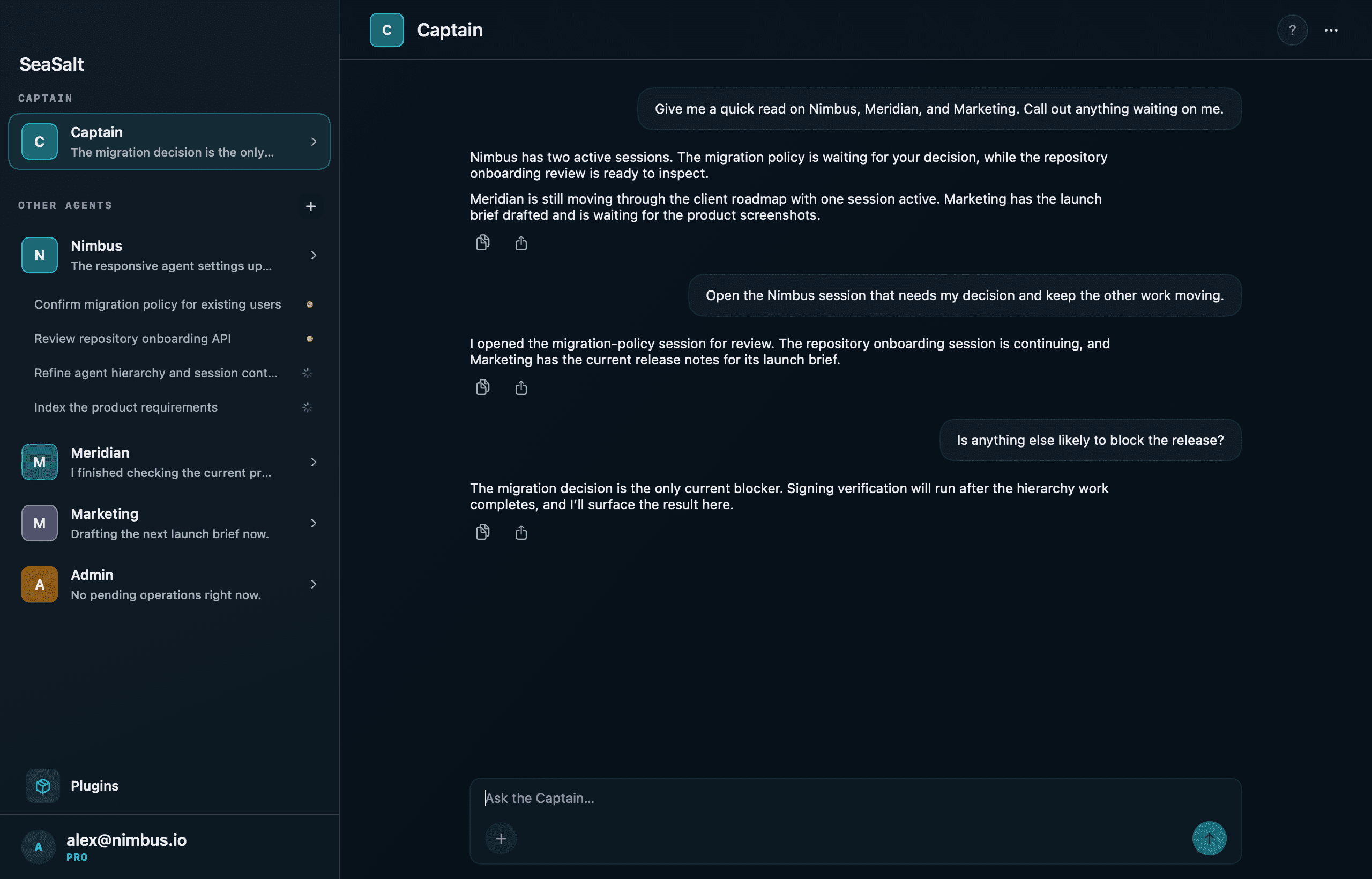
There's one thing the Captain deliberately can't do: start a Work Session itself. When work needs doing in a project, the Captain asks that project's agent to do it. The project agent holds the context that makes the work go right: the instructions, the folder, and which plugins it's allowed to use. A Captain that launched coding work directly would skip all of that.
What this changes day to day
"What's waiting on me?" is one question. Ask the Captain and it checks with each agent, instead of you opening every thread.
Rules stick. Instructions live in the agent's brief, not in scrollback, so the hundredth session in a project gets the same rules as the first.
Access has boundaries. Plugins such as Linear, Notion, GitHub, or Stripe are turned on per agent, and turning one on for an agent includes that agent's Work Sessions. Your marketing agent doesn't need your Stripe connection, and with this setup it doesn't get it. Within a connection, each kind of action (read-only, changes data, external communication, destructive) is set to Allow, Ask, or Deny.
The phone shows the same structure. The iPhone app lists the Captain first, then each agent with its active sessions underneath and a status (Working, Awaiting approval, Unread message), so a glance tells you where things stand.
The trade-offs
This is more structure than a chat window, and sometimes you don't need it. For a quick question about a project, just talk to its agent; nothing forces you to open a session. And because sessions work directly in the project folder rather than in separate copies, it's up to you to keep parallel work from colliding.
We still think the split is right. The project keeps a memory, each piece of work gets a boundary and a record, and one conversation sits above it all for when you need the whole picture.
macOS 15+ · Apple Silicon & Intel